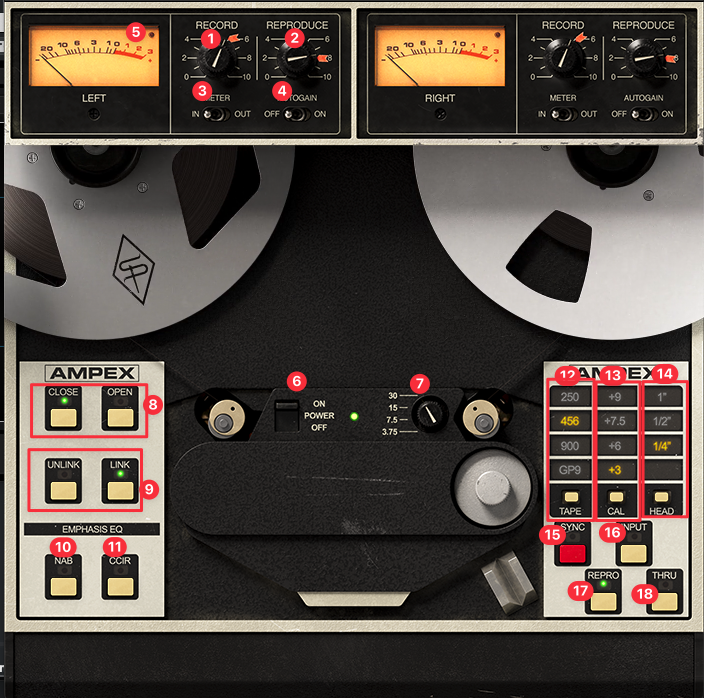
- Record: Signal into plug-in and tape circuit (primary color control) (red arrow or Label double click or Option Click sets to default = red arrow label = 0db)
- Reproduce: output (red arrow or Label double click or Option Click sets to default = red arrow label)
- Meter:
IN -> Signal before processing
OUT -> After processing (after Reproduce=output gain)
(Signal with -12db shows 0db on Meter, plugin operates at -12dbFS) - Autogain: Automatically prevents volume increasing when adjusting Record/Reproduce levels
- LED Clipping Indication: Illuminates only when machine’s audio electronics clip. If tape is overloaded and distorted the LED is not affected
- Power On/Off: When Off emulation is disabled, resource usage reduced
- Select Tape speed: 30 most hi-fi, almost same as input, 15 a bit of tape compression, transient control, a little glue, little low frequency bump
15 good for rock
7.5 / 3.75 for more distortion, parallel process etc. - CLOSE:
Only shows primary controls
OPEN: Shows Secondary controls (see below) - LINK / UNLINK: set left and right individually
- NAB: US Standard EQ setting (OPEN (8) to see difference) only on 15/7.5 speed
- CCIR: British Standard EQ Setting (OPEN (8) to see difference) only on 15/7.5 speed
- Tape: chose tape formula (eg. 7.5 speed has different formulas)
- Cal Level: how much headroom is left available, eg. +9 has lower output level than +3 (+3= only 3 headroom left) -> +3 = loudest output
eg. low level input-> set to +3, too hot -> set to +9 - Head: 1″ most hi-fi
- Sync: Lo-Fi sounding, used to record and playback at the same time (generally not used for playback, only for creative purposes)
- Input: skips tape transport, only monitoring through machine electronics
- Repro: Recording with record head and playback through reproduction head (all corresponding machine electronics active)
- Thru: Bypass, similar as off but metering still active
Secondary controls
OPEN State (8)
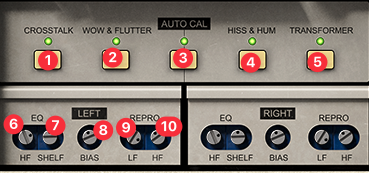
- Crosstalk: signal bleed between left and right channel
- Wow & Flutter: «undesirable» pitch modulations induced by the mechanical components of the tape transport. (wow = lower, flutter = faster flucations)
- Green: Calibration is done according to tape formula, red: calibration is manually changed (6,7,8,9,10) -> double click: Auto Calibrate to active tape formula. Off: 6,7,8,9,10 does not change when changing tape formula
- Hiss & Hum: Hiss & Hum noise added based on tape speed
- Transformer: simulates the behavior of the transformers in the hardware circuit
- HF: High frequency EQ (boosts / cuts around 20khz), turning right from calibrated state boosts, turning left cuts
- Shelf: High frequency shelf EQ from around 3khz (more hearable), turning right from calibrated state boosts, turning left cuts
- Bias: turning right from calibrated state adds tape compression (wamer, gently saturated sound), turning left: underbiasing can also add distortion and may cause audio to drop out
Possible workflow
- Choose tape formula first (with Auto Cal on)
- Use Record to add color
- Choose tape speed, head
- Tweak eq (opened state)
Tipp: Use Wow&Flutter to make midi drums, instruments sound more natural